

Did your ADT alarm system activate, and you don’t have the code? Don’t worry–we have a step-by-step guide to help you turn off your system. However, you must follow the directions carefully to deactivate the ADT alarms quickly.
Follow these steps to turn off an ADT alarm system without a code:
- Step 1: Unplug the system’s transformer box and remove its backup battery supply
- Step 2: Locate the breaker in your panel giving power to the ADT alarm system
- Step 3: Turn off the ADT alarm system using the breaker to shut off the system
Once you have shut off the alarm system, there are other steps to help reset your ADT system for future use. This article will teach you how to turn off an ADT alarm system without a code and set yourself up to reset it.
Is it Possible to Disarm an ADT Alarm System Without a Code?

When an ADT alarm system is triggered, it is up to the system’s owner to disarm the alarms with a unique passcode. However, you may be in a situation where you have forgotten or never received the code for the system when you bought a home with ADT.
If you are in this circumstance, you must reset the system’s code. The only way to turn off an ADT alarm system without a code is by physically removing its power source. While this is frustrating, it will stop the loud alarm ringing throughout your home.
Fortunately, ADT has added new alarm system features, including a key fob option to deactivate a system. In most cases, a code is the only deactivation option for an older security system model.
3 Steps to Turn Off an ADT Alarm System Without a Code
When your ADT alarm system is beeping loudly, you must act quickly to turn it off. While this situation can be chaotic, we have broken down the solution into three simple steps. Follow the steps below to turn off an ADT alarm system without a code.
Step 1: Unplug Transformer and Remove the Battery
ADT alarm systems use a 12v DC transformer plugged into a standard 120v outlet. When installed properly, this transformer is screwed to the power outlet to prevent it from coming out during operation.
A wire is connected from this transformer to the ADT alarm system in your home. When the ADT alarm is triggered, locate the DC transformer and unplug it from its power supply if possible.
Along with the transformer, you should remove the battery from the command panel of your ADT system. When you remove the transformer, the system will begin to beep and present an error message stating, “No AC.”
Depending on your model, there are various ways to remove the backup batteries from an ADT alarm system model. In most cases, you will need to remove the screws until you locate and remove the battery pack.
Step 2: Locate the Breaker Providing Power to the System
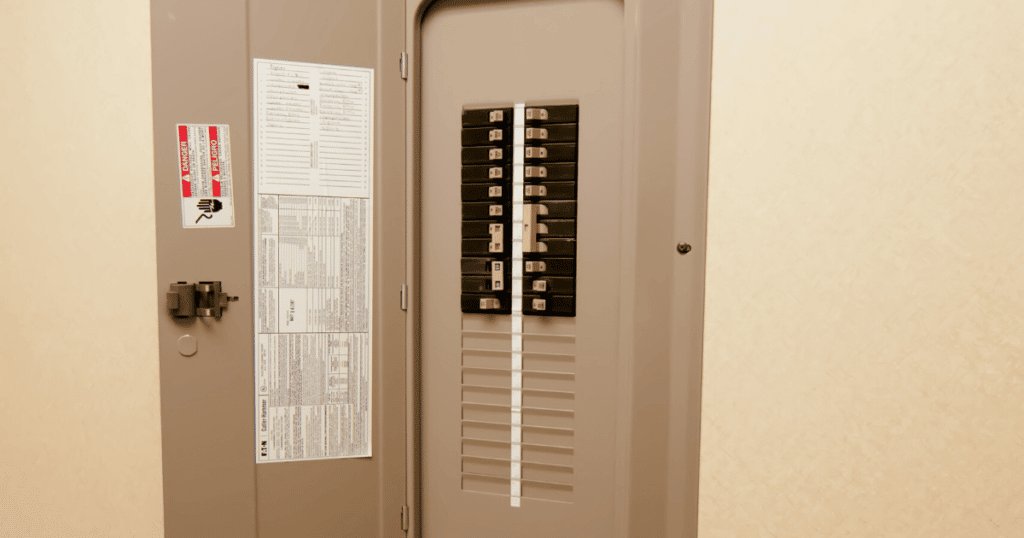
When you don’t have a screwdriver, your next option is to shut off the power by turning off the breaker. An electrician will add a new breaker responsible for powering the 120v outlet for the security system’s transformer during installation.
Once you open your electrical panel, you should look for a breaker labeled for your alarm system. If you worked with a professional electrician, they should have clearly labeled your new breaker.
If the system isn’t labeled, it should be located at the bottom of the panel, and you can trace the wire from your alarm system’s outlet. The wire will enter through the side of the panel, helping for easy location.
Step 3: Turn Off the Breaker to The Alarm System
Once you’ve located the breaker in your home’s electrical panel, you should turn it off to stop the beeping. If you’ve removed the backup battery in the command panel, the system should go silent in your home.
If you only turn off the breaker, the system will likely continue beeping as the backup battery is powering the alarm. After all power supplies are removed, you can have a sense of peace in your home.
Once you turn on the power of your ADT alarm, you will restore it to its base settings, and you can reset your alarm system code. Ensure you remember the code for your alarm to prevent this from happening again.
Frequently Asked Questions
There is no way to bypass a code on an ADT system if the alarm is triggered by someone entering a zone. If you forgot the code of your ADT system, you would need to reset it and remember it for future use. Removing the power supply is the only way to turn off an ADT alarm system without the code.
Unfortunately, it is possible to hack an ADT system if the hackers find a weakness in the system’s technology. While it’s not common, you can protect your system by updating it regularly. If there is a system update on your phone, you should ensure it updates immediately to lower your risk of being hacked.
If you want to turn off your ADT system permanently, you can unplug the device’s transformer that supplies power to the alarms. This DC 12v transformer is usually next to your home’s main electrical panel. You can unplug your ADT system by unscrewing the transformer from the power outlet.
Conclusion
Are you wondering how to turn off the ADT alarm system without a code? By following the three basic steps in this article, you can turn off your ADT system. If you need assistance with resetting your ADT code, you can contact ADT support for help.