
Does your Schlage lock blink green but won’t open? While this may seem like a rare problem, you aren’t alone. A Schlage lock that blinks green but won’t open is a problem shared among owners of numerous lock models.
The most common reasons for this lock issue are:
- Improper Lock Installation
- Activated Lock Override
- Low Battery Level
- Dirt or Rust Buildup
- System Technical Glitch
Before you decide your lock is defective, explore these five possibilities for your Schlage lock. Keep reading further to learn about the causes and solutions for a Schlage lock that blinks green but won’t open.
What Does a Blinking Green Light Mean on Schlage Lock?

When entering your user code into the Schlage lock, it will blink green to confirm you entered the correct combination. Generally, when you see this blinking green light, you can open your door to enter the property.
However, there may be situations when the lock blinks green, but the bolt stays engaged in the door. In order to attempt a solution to this issue, you must first utilize the key feature of the Schlage smart lock to open the door.
Once you’ve opened the door, you can access the back panel and fix the problem with your Schlage lock. Below are the most common reasons for this issue, from most likely to least likely to occur.
5 Reasons For a Schlage Lock That Blinks Green But Won’t Open
Improper Lock Installation
When our readers mention this problem with their Schlage lock, it’s most commonly after the initial installation. Whether it’s loose parts or an unaligned lock, the first step for solving this problem is ensuring everything is correctly installed.
The easiest way to know if your lock was installed correctly is if it works when using the included standard key. When the key engages the deadbolt smoothly and opens the door, this is a good sign you installed it right.
Additionally, you should confirm the Schlage lock was installed on the correct side of the door. A Schlage lock requires a specific orientation to work on your door. If you installed it on the wrong side, the deadbolt won’t engage correctly.
Activated Lock Override

The lock override is a method of completely turning off the keypad of your Schlage smart lock. If you prefer to use the key, you can utilize the lock override feature to remove the possibility of someone using the keypad.
However, this lock override feature requires you to disassemble the lock and rotate the screw labeled “LOCKOUT.” If you haven’t activated the lock override of your Schlage lock, it will rarely activate automatically.
Additionally, most lock models will not display a blinking green light when you activate the override feature. The lock override feature cuts off the power supply to the keypad, disabling the light from blinking green.
Low Battery Level
In some cases, if the Schlage lock has faulty or expired batteries, it won’t receive enough power to open the lock. However, the batteries may produce enough power to cause the Schlage lock’s light to blink green.
While Schlage locks have a low-battery indicator, it may not be as accurate in older product models. If you haven’t replaced the batteries in a while, replacing them may be a good idea to see if it resolves the issue.
Schlage recommends that you avoid rechargeable and lithium batteries for your smart lock. These battery types run out of energy faster and pose risks to your Schlage lock that can cause irreversible damage.
Dirt or Rust Buildup
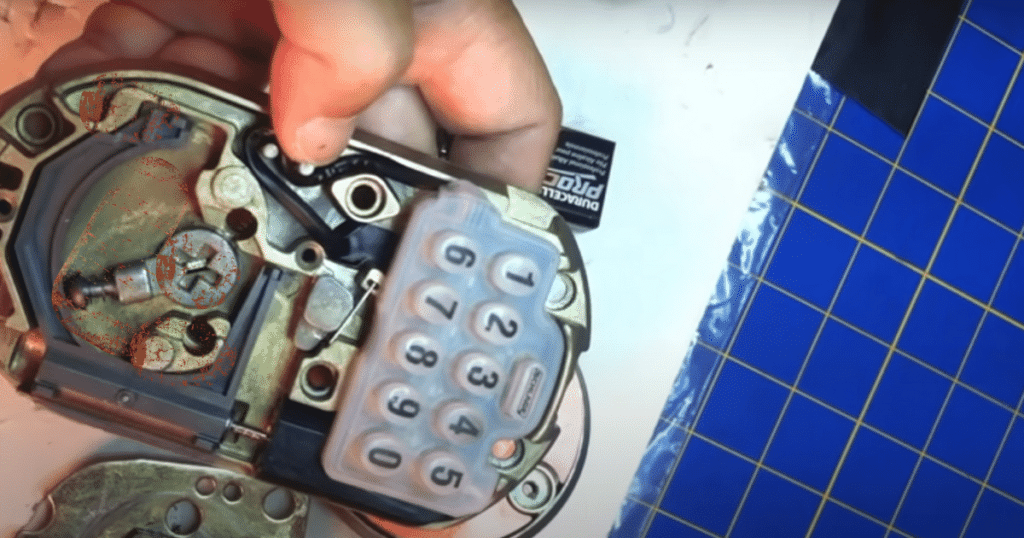
When rust or grime develops on the inside of the Schlage lock, it can affect the functionality of the deadbolt. The grime can prevent the gears from turning and leave you with a stuck lock on your door.
You can confirm that something is wrong with the internal components by attempting to use the key. If the key turns roughly with enough force, this is a sign that something is wrong and needs lubrication.
Owners can improve the operation of their Schlage lock by opening it and utilizing an effective lock lubricant. These lubricants will grease the lock’s internal components and remove the rust from the lock.
System Technical Glitch
While rare, a technical glitch can cause a Schlage lock to blink green but not open. If you tried to fix the other potential causes, you may be at a loss for ideas. Fortunately, there are still solutions for a technical glitch with the system.
The best way to resolve a technical issue with a Schlage lock is by performing a factory reset on the device. Factory resets will erase the user codes and any unique system settings you have set for your lock.
Once you have factory reset the lock, you can start by testing the default user code to determine if the lock operates. Inputting the default setting will cause the light to blink green and open the lock again.
How to Factory Reset a Schlage Lock

When experiencing a technical glitch, your best option is to hard reset the Schlage lock to see if it fixes the issue. As a Schlage lock owner, the factory reset is your primary option for resolving technical problems.
Follow these steps to reset your Schlage lock that blinks green but won’t open:
- Open the Door: In order to access the back panel, you must open the door and unlock the Schlage lock.
- Take the Battery Panel Off: Remove the back panel by unscrewing the fasteners and sliding the connector plate off.
- Remove the Battery Pack: Disconnect the batteries from the lock, but keep them nearby for the next step.
- Press the Schlage Button: Once you have pressed the Schlage button on the keypad, you should connect the batteries within 10 seconds.
- Press and Hold the Schlage Button: After reconnecting the batteries, hold the button for at least 10 seconds.
Frequently Asked Questions
When a Schlage smart lock battery dies, keyless entry methods, like keypad codes or remote control via a smartphone app, won’t work. Users must use a physical key to unlock and lock the door. Some models have a backup power option, allowing a 9V battery to power the lock temporarily.
A Schlage door lock may stop working for various reasons, often caused by mechanical or electronic issues. Over time, wear and tear can affect the lock’s internal components, causing system malfunctions. Battery depletion in electronic models or electrical failures may lead to unresponsiveness if left unattended.
If your Schlage lock is in vacation mode, turn it off by pressing the Schlage button and then your programming code. When you attempt to enter your user code while in Vacation mode, it will not work until turned off. You can confirm that the Vacation mode was deactivated when you hear an audible two beeps.
Conclusion
If you are facing a Schlage lock that blinks green but won’t open, we hope the solutions in this article help you. It may take a while to locate the source of the problem, but it is easy to resolve it once you discover it.
Did you have a Schlage lock blinking green but not opening? Let us know if your problem was solved in the comments!